
Your Guide to Digital Booklets
What is a digital booklet?
A digital booklet is an online, interactive version of a traditional booklet—designed for smooth digital viewing and easy sharing across devices. It presents information in a visually engaging format, and includes page-flip navigation, clickable links, embedded videos, and interactive elements to keep readers engaged.
Unlike a printed booklet, a digital booklet can be distributed instantly via a link, email, QR code, or embedded on a website. Businesses commonly use digital booklets for product highlights, company overviews, brochures, onboarding materials, event guides, especially when they want a polished layout without the limitations of print.
The history of booklets - From ancient times to digital publishing
Ancient times - Early precursors to booklets appear as folded papyrus and parchment documents
15th century - The printing press enables mass production of small pamphlets and booklets, making information accessible beyond wealthy elites
1517 - Martin Luther's 95 Theses, distributed as a printed booklet, demonstrates the power of small-format publications
1700s-1800s - Trade booklets and product guides become common marketing tools for merchants and manufacturers to showcase offerings
1920s-1940s - The golden age of travel booklets, with railroads, hotels, and tourism boards creating illustrated guides to promote destinations
1950s-1960s - Educational booklets flourish in schools and workplaces as cost-effective training materials and reference guides
1990s - Desktop publishing democratizes booklet creation, allowing small businesses to design professional materials in-house
2000s - PDF booklets emerge for digital distribution via email and websites, reducing printing costs while maintaining traditional layouts
2010 - The iPad launch accelerates interactive booklet formats with embedded videos, animations, and clickable navigation
2020 - The COVID-19 pandemic drives virtual event programs, digital onboarding booklets, and contactless information sharing
2026 - AI-powered design tools transform booklets into engaging, trackable assets
Why choose digital booklets over print?
Digital booklets combine traditional booklet formats with powerful digital capabilities. Going digital means more flexibility, better reach, and measurable results that help you connect with your audience more effectively.
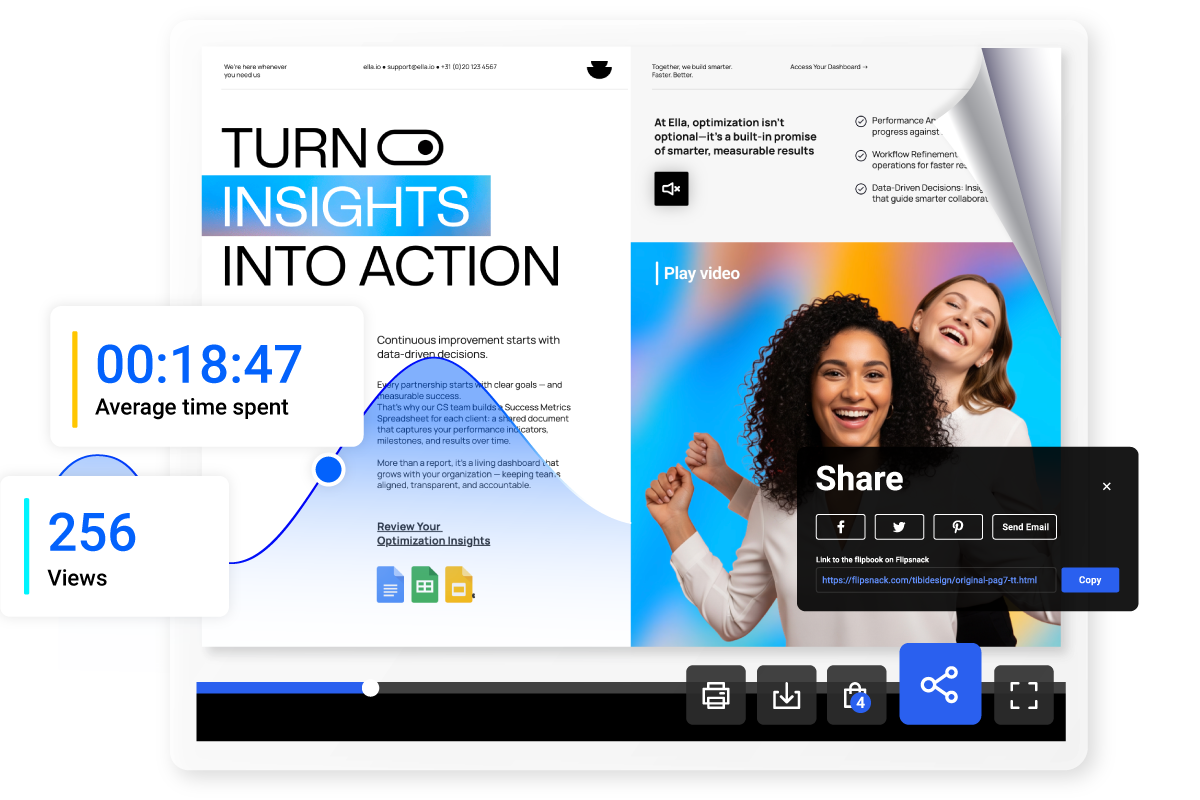
Interactivity
Transform static pages into engaging experiences by embedding videos, clickable links, contact forms, and navigation buttons. These interactive elements keep readers engaged and guide them toward specific actions like visiting your website or contacting your team.
Wider distribution
Distribute your digital booklet instantly through email, website embeds, social media, or QR codes. Unlike physical booklets limited by printing costs, you can reach unlimited audiences anywhere with a single link.
Easy updates
Make changes to your booklet content anytime without reprinting. Simply edit text, swap images, or update details, then republish—your audience automatically sees the latest version through their existing link.
Performance tracking
Track page views, time spent reading, and clicks on embedded links to understand how recipients interact with your booklet. These booklet analytics help refine your messaging for future campaigns—something impossible with printed booklets.
How to create a digital booklet
Creating a digital booklet is straightforward and follows key steps that apply across most platforms, whether you're designing marketing materials, event programs, or informational guides.
Create a digital booklet1. Upload and edit PDF or choose a template
Start by selecting your preferred method: upload an existing PDF booklet, build one from scratch using the Design Studio, or browse pre-designed booklet templates. Each path leads you seamlessly into customization, so choose what works best for your timeline and design needs.
2. Add branding & interactivity
Incorporate your brand identity with logos, custom fonts, and brand colors. Enhance engagement by adding interactive elements like clickable links, embedded videos, contact forms, or navigation buttons that guide readers through your content.
3. Publish and share everywhere
Publish it publicly for broad distribution or keep it private for specific audiences. Unlike printed booklets that require physical handling, you can instantly reach stakeholders, event attendees, or prospects through email, social media, or embedded links on your website.
4. Track engagement and performance
Monitor how recipients interact with your booklet after distribution. Track metrics like page views, time spent on each section, and click-through rates on embedded links. These insights help you understand what content resonates and refine future booklets accordingly.
5. Update content without reprinting
When details change—whether it's updated event information, new product features, or revised contact details—simply edit your digital booklet and republish. Your audience automatically sees the latest version through their existing link, eliminating the waste and expense of reprinting.
Business Booklet Templates
Choose from our collection of business booklet templates that are professionally designed and easily customizable. Present your services, showcase company capabilities, or create sleek proposals that reflect your brand identity and engage clients from the first page.
Create a business bookletInformation Booklet Templates
Browse our selection of information booklet templates designed for clear communication. Whether you're creating training materials, product guides, or instructional content, these templates help you organize complex information into digestible, visually appealing formats that keep readers engaged.
Create an information bookletTravel Booklet Templates
Explore our range of travel booklet templates perfect for tour operators, hotels, and destinations. Create inspiring itineraries, destination guides, or travel packages that capture the excitement of exploration while providing practical information travelers need.
Create a travel bookletLearn more about digital booklets
More related topics
1. Getting started
- What is a digital booklet
- How to create digital booklets that drive results
- Transforming PDFs into booklets
- Best digital booklet makers
2. Design & Optimization
- Digital booklet design
- Interactive features to enhance digital booklets
- Mastering online booklet templates: tips, tricks and best practices
- Professional booklet templates for your business
3. Use Cases & Applications