WCAG 2.1 Level AA
The benchmark almost every other rule points back to. Flipsnack's flipbook player is built to it.

Every guest should be able to read what you hand them, and that is no longer optional. More than 3,000 federal ADA web accessibility lawsuits were filed in the US in 2025, and hospitality is one of the most targeted industries.
Trusted by leading hotel groups and hospitality brands






A PDF only works with a screen reader if someone tags it: every heading marked, the reading order set, a table structured, alt text written for every image. That is specialist work, it takes hours per document, and it has to be redone the moment a price or a photo changes. Now multiply it by every menu, guide and brochure at every property in the portfolio.
So it doesn't get done. The files go out untagged, and the guest using a screen reader hears nothing useful.
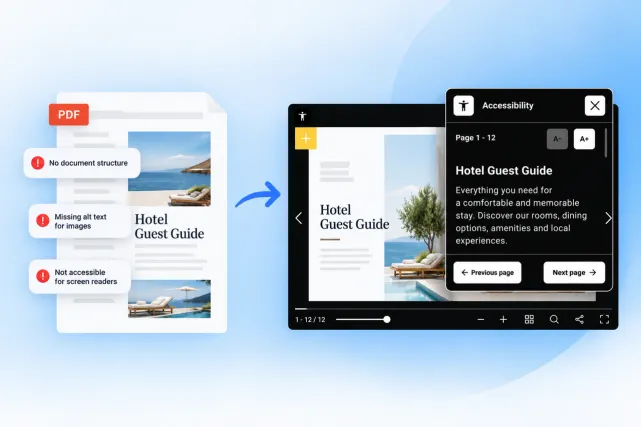
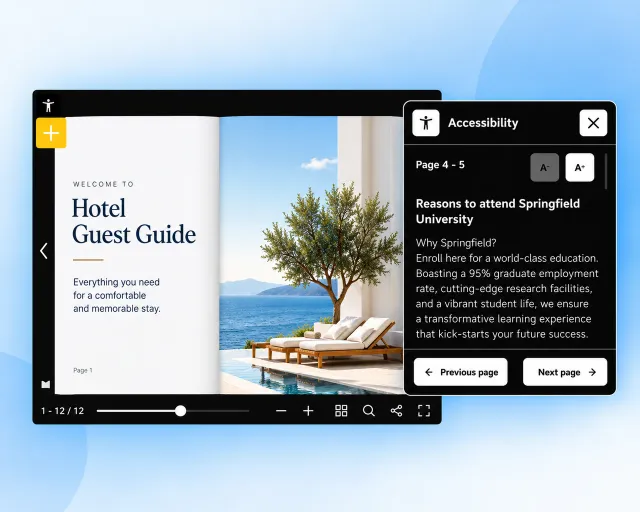
Open the accessibility icon in the top left, or press Tab then Enter. The panel reads out the page in front of you.
The benchmark almost every other rule points back to. Flipsnack's flipbook player is built to it.
Covers public accommodations, hotels included. Our player is ADA compliant.
Applies when you host government and federal agency business. Our player is compliant.
The European standard and the European Accessibility Act. Relevant to every brand operating in the EU.
Flipsnack publishes a Voluntary Product Accessibility Template, so your legal and procurement teams can check the conformance claims themselves. The full Flipsnack accessibility statement sets out what the player conforms to.
The player is the part every reader touches, and it's one of the few genuinely accessible flipbook players on the market. It reads out the page text you put in, which is the step the next section covers. See the full accessibility feature set.
Readers move through pages and interactive elements without a mouse. Logical tab order, visible focus.
Every button and interactive element carries a clear label. Works with the reader's own software: VoiceOver, NVDA, JAWS or TalkBack.
Readers open it from the icon in the player, or with Tab then Enter. It shows the current page's text, with controls to resize it and move through the flipbook.
Upload an accessible PDF version to the flipbook and readers who'd rather have the file can download it from the player.
In the template, open Customize, then Add-ons, then Accessibility. The accessibility icon appears in the player for every document built from it.
Extract the text already on each page, or have Flipsnack's AI draft a summary per page. Either way, nobody starts at a blank field.
Corporate writes the page titles, descriptions and image alt text for every fixed section. Properties only describe the images they upload themselves.
A person checks the text and edits anything inaccurate before saving. AI drafts, your team approves, and the template carries it to every property.
Find a problem in a section every property publishes, and you correct it in the master and push. Nobody re-exports a PDF. Nobody re-sends a link. The version a guest already has updates itself.
Before you can fix anything, though, you need to see it. Corporate views every property's live documents from one place.
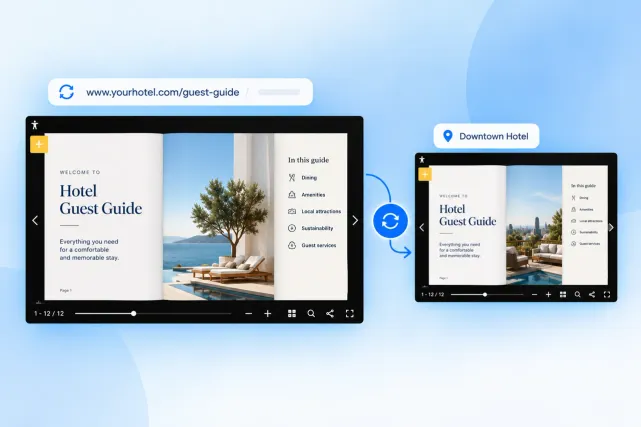
Accessibility set at corporate level, inherited by every property workspace, visible from one account.
We chose Flipsnack for its user ability, internally and externally. My team loves how easy it is to upload our assets and create custom links allowing us to distribute with our guests efficiently.

Book a call and bring a menu, guide or brochure a property publishes today. We'll run it through a screen reader with you, then rebuild it as an accessible flipbook.